

Uncategorized
What Is an Access Audit Trail and Why It Matters
In today’s security-conscious world, knowing who accessed what and when is just as important as locking the door. That’s where an access audit trail comes into play.
Whether you’re managing a corporate office, apartment complex, warehouse, or school, an access audit trail offers crucial insight into your building’s activity—and plays a critical role in security, accountability, and compliance.
What Is an Access Audit Trail?
An access audit trail is a digital log that records every instance of door access within a controlled environment.
Each entry typically includes:
- Date and time of access
- Identity of the person (via PIN, keycard, mobile credential, etc.)
- Entry point used (e.g., front door, server room)
- Access status (granted or denied)
This information is automatically recorded by your access control system and stored for later review.
Why Access Audit Trails Matter
✅ 1. Enhanced Security
When you know who entered (or tried to enter) a space, you can:
- Detect unauthorized access attempts
- Identify suspicious behavior patterns
- React quickly to security breaches
Audit trails act as a digital witness, helping you see what happened, when, and by whom.
✅ 2. Operational Transparency
Audit trails create a clear history of employee or tenant movement. This can help resolve questions such as:
- Who was last in the server room?
- Did the cleaning crew lock up properly?
- When was the main door last opened?
It brings visibility to what would otherwise be blind spots.
✅ 3. Accountability and Oversight
With access logs:
- Staff and tenants are more accountable for their actions
- Managers can verify access compliance
- Suspicious events can be investigated with confidence
No more “he said, she said”—just facts.
✅ 4. Compliance and Legal Protection
For industries that handle sensitive information (healthcare, finance, legal), audit trails help:
- Meet regulatory standards (HIPAA, PCI-DSS, etc.)
- Document compliance during audits
- Protect against liability in the case of breaches
In legal situations, access logs serve as evidence that your systems were used correctly—or not.
✅ 5. Better Incident Response
If a break-in or internal theft occurs, an audit trail allows you to:
- Pinpoint the timeline of events
- Narrow down suspects
- Share detailed access data with law enforcement
The faster you can understand what happened, the faster you can respond effectively.
What Makes a Good Audit Trail?
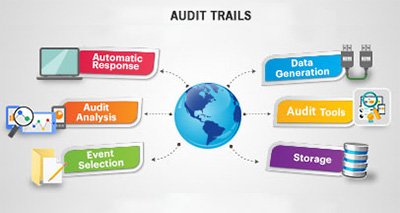
Look for access control systems that provide:
- Real-time logging and notifications
- Detailed user information
- Searchable, exportable reports
- Tamper-proof records
- Cloud-based or remote access to audit data
Bonus features may include video integration so you can view footage tied to specific access events.
Integrated Access and Audit Trail Solutions
When paired with alarms and surveillance, access logs become even more powerful. You can:
- Automatically flag repeated failed access attempts
- Trigger alerts for after-hours entries
- Link logs with camera footage for a complete security picture
This integration creates a smart, responsive environment that adjusts to emerging threats.
OnGuard Security Makes It Easy
At OnGuard Security Solutions, we install and maintain smart access control systems with full audit trail functionality. Our solutions help:
- Track every door access
- Provide cloud-based reports and mobile access
- Integrate with surveillance and alarm monitoring
- Comply with industry regulations
Whether you manage a building, business, or campus, we’ll help you secure and monitor it intelligently.
Secure Your Property with Insight
Don’t just control access—understand it. With a powerful access audit trail, you get the transparency, security, and control today’s buildings demand.
Contact OnGuard Security Solutions today to schedule a demo or learn more about access control and audit trail features.
Kirk Booher, Onguards.